What is MacBaram?
The canonical product guide to thermal trends, fans, charging, sleep, support, and restore behavior.
Read guide MacBaram
Start with the problem: a hot MacBook, fan speed or fan curve, an always-plugged-in battery, a Mac that sleeps during work, or a long local AI, build, render, or download job.
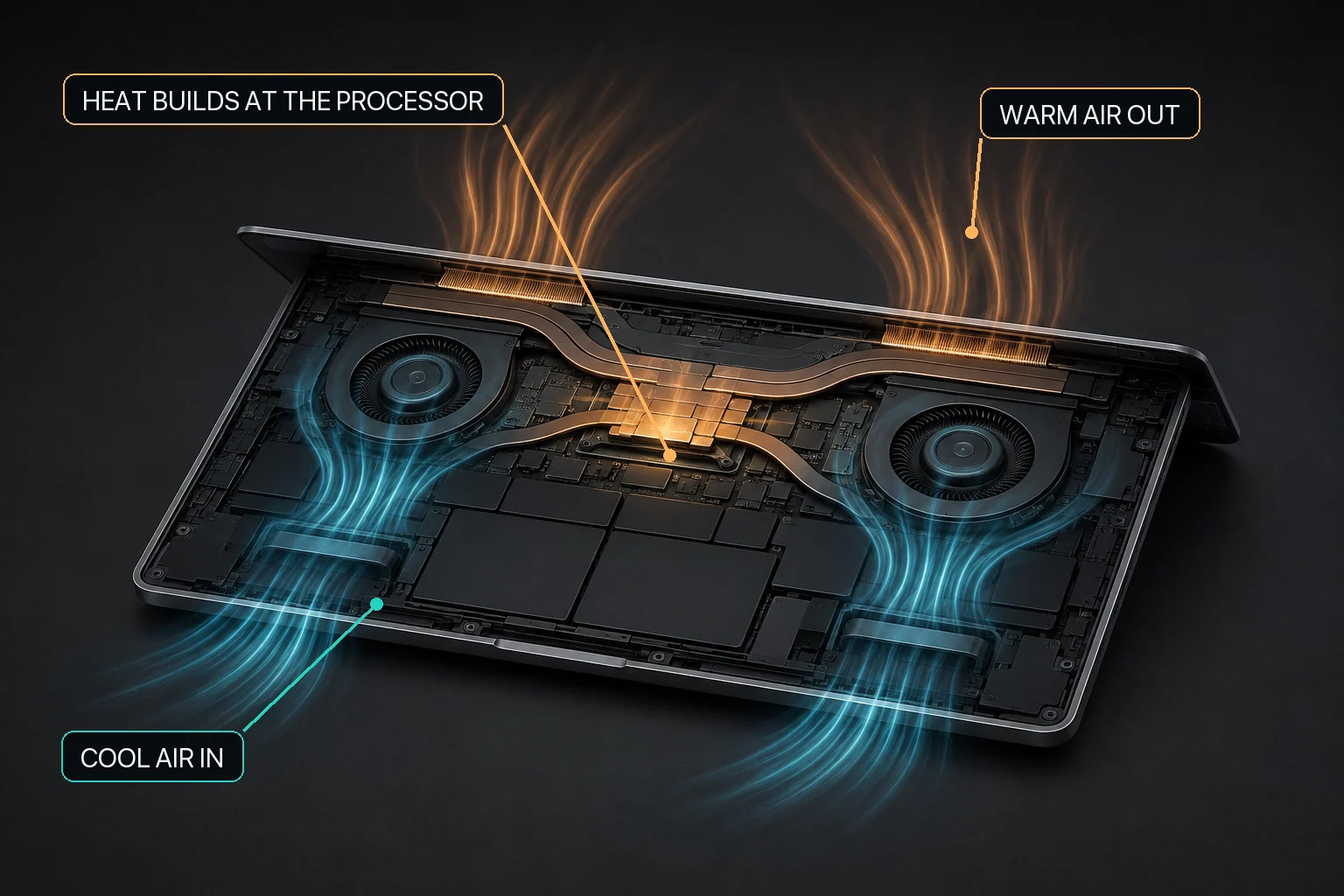
MacBaram is a Mac control app that brings CPU-temperature and fan-RPM trends, optional fan control, battery charging policies, and separate system-sleep and display-sleep controls into one operating view. Where Virtual Clamshell is available, MacBaram can keep a workload running with the lid closed and no external monitor. Test the exact workload before relying on it. Fan and battery controls retain their own hardware support conditions. MacBaram does not replace macOS thermal management, hardware diagnostics, application recovery, or Apple service.
These guides explain the tradeoffs behind each control. They do not promise lower temperatures, longer battery life, or uninterrupted work on every Mac. Hardware, macOS settings, connected devices, and the workload itself all matter.
Use these broad guides to identify the relevant Mac state before choosing a narrower answer.
The canonical product guide to thermal trends, fans, charging, sleep, support, and restore behavior.
Read guideSeparate normal workload warmth, airflow, background work, fanless limits, and service conditions.
Read guidePrepare builds, renders, local AI, downloads, and transfers before leaving the Mac unattended.
Read guideUnderstand workload heat, thermal trends, airflow noise, fan hardware, and reversible fan choices.
Start with macOS automatic behavior, then decide whether optional fan control applies.
Read guideFind background work and observe cooldown before treating fan speed as the cause.
Read guideDistinguish workload airflow from persistent or mechanical sound.
Read guideKnow what can be observed when the Mac has no fan for software to control.
Read guideChoose a supported fan response intentionally and keep a route back to macOS.
Read guideRead direction, duration, workload, and fan state instead of diagnosing from one number.
Read guideClassify fan sound before deciding whether software control is relevant.
Read guideCompare Apple charging behavior with explicit MacBaram policies without turning one percentage into a health diagnosis.
Understand what a selected charging target changes and how to restore ordinary charging.
Read guideCompare Apple schedule-aware behavior with a user-selected target.
Read guideChoose a routine policy for desk use and plan temporary mobile charging.
Read guideSeparate a current thermal condition from long-term battery condition.
Read guideCheck Apple charging pauses, temperature, power, and the selected policy in order.
Read guideLearn when the policy reduces immediate repeated recharging near the selected target.
Read guideRead the research carefully without converting it into a universal lifespan promise.
Read guideCharging and available cooling should not ignore the same battery-temperature condition.
Read guideKeep the required Mac state active while leaving application success, power, network, and storage as separate checks.
Choose system sleep, display sleep, or Virtual Clamshell for lid-closed work.
Read guideKeep background work active without requiring the screen to stay lit.
Read guideUnderstand when Virtual Clamshell is the separate supported path.
Read guidePrepare Xcode, Gradle, Docker, Codex, Claude Code, and similar jobs.
Read guidePrepare Final Cut Pro, DaVinci Resolve, Premiere Pro, Blender, and similar jobs.
Read guideSeparate transfer continuity from screen visibility.
Read guidePlan power, memory, thermal context, cooling, and sleep before a long run.
Read guideInterpret sustained local-inference load on fan-equipped and fanless Macs.
Read guidePreserve system work while allowing the display to turn off.
Read guideSee why a keep-awake request should step back when external power disappears and the battery reaches its safety boundary.
Read guideGive temporary sleep control a visible exit and verify the return toward ordinary macOS behavior.
Read guideDifferent wording can describe the same operating condition. This map connects common Mac questions to the guide that answers them directly.
| User question or symptom | Related terms and concepts | Start here |
|---|---|---|
| Can I remember different mouse settings at home and at work? | Remember familiar control settings for each mouse you use at home and work. | Mouse presets |
| How can I prioritize my preferred speakers and microphone when devices connect? | Remembers your preferred speaker and microphone order and selects a device to match what is connected. | Preferred audio device order |
| Where can I change the audio output sample rate? | View and select sample rates supported by the current output device. | Output sample rate |
| Can I restore my display configuration after reconnecting a monitor? | Remembers monitor positions, resolutions and color profiles, restoring them when the connection setup returns. | Remember display configuration |
| Can I safely eject all external disks at once? | Safely eject connected external disks together before you head out. | Safely eject all external disks |
| How can I switch keyboard input sources faster? | Press and release the selected key to switch once to the previous input source with less delay. | Quick input-source switching |
| What does MacBaram control, which features apply to my Mac, and how do I return to defaults? | Mac control app, thermal trends, fan presets, charging policies, system sleep, display sleep, support conditions, restore | MacBaram Mac control guide |
| Why is my MacBook so hot during or after an identifiable workload? | MacBook overheating, sustained CPU/GPU load, recovery after work, airflow, Apple Diagnostics | MacBook too hot? |
| Why is my Mac hot when no app appears busy? | idle heat, background process, indexing, synchronization, Activity Monitor, cooldown trend | Mac hot while idle |
| Why does my Mac fan keep running? Should I change fan speed or use a fan curve? | Mac fan control, manual fan control, fan RPM, fan speed, unified fan curve, fan presets, macOS default fan behavior | Mac fan control |
| Why does my MacBook sound like a jet engine during heavy work? | smooth fan airflow, loud fan, rushing air, workload, ventilation, recovery | Jet-engine airflow sound |
| What should I do about a Mac fan that rattles, clicks, scrapes, grinds, or vibrates? | mechanical fan noise, abnormal sound, restore, diagnostics, Apple service | Mechanical fan-noise decisions |
| Should I choose Silent, Balanced, Performance, or the macOS default fan mode? | fan preset, noise preference, workload, thermal trend, reversible comparison | Mac fan preset choices |
| Can one temperature number tell me whether my Mac is overheating? | thermal trend, duration, direction, workload context, fan state, diagnosis boundary | Thermal trends, not one reading |
| Why is my MacBook Air hot but completely silent? | fanless MacBook Air, passive cooling, sustained workload, throttling, no controllable fan | Fanless MacBook Air heat |
| How do I limit MacBook charging? Is an 80% charge limit useful when always plugged in? | Mac battery charge limit, optimized charging, plugged-in MacBook, Charge Protector, charging hold | Mac battery charge limits |
| What is the difference between Apple Optimized Battery Charging and a manual charge limit? | learned schedule, explicit target, supported current macOS | Optimized charging versus a charge limit |
| How should I charge a MacBook that stays plugged in most of the day? | desk use, always plugged in, routine target, mobile runtime | Always-plugged-in charging policy |
| Does a warm battery mean that my MacBook battery health is bad? | battery temperature, battery health, current condition, long-term aging, service state | Battery temperature versus battery health |
| Why did my MacBook stop charging when it became hot? | temperature-related charging pause, power source, battery policy, charging status | MacBook not charging when hot |
| What does MacBaram Charge Protector do near my selected charging target? | near-target battery-percentage drop, immediate repeated recharging, charging policy, restore | Charge Protector explained |
| How do time, temperature, and state of charge relate to lithium-ion calendar aging? | calendar aging, cycle aging, temperature, voltage, state of charge, research boundary | Lithium-ion calendar aging evidence |
| Why should charging and available cooling respond to the same battery-temperature condition? | Heat Protection, battery temperature, charging pause, fan response, restore | Why charging and cooling should coordinate |
| How do I prevent ordinary user-idle system sleep during a long task? | prevent Mac sleep, user-idle system sleep, long-running job, restore ordinary sleep behavior | Keep a Mac awake |
| Can the Mac keep working while the screen turns off? | system sleep, display sleep, dark display, background work, power assertion | System sleep versus display sleep |
| Can I close a MacBook lid without an external monitor and keep the session active? | lid close, idle sleep, Virtual Clamshell, external-display-free workflow | Lid close versus idle sleep |
| What should I check before any long build, render, AI job, download, or transfer? | preflight, power, ventilation, memory, storage, network, progress, restore | Long-running task checklist |
| How do I keep Xcode, Gradle, Docker, Codex, or Claude Code running during a long build? | build, compiler, container, coding agent, system sleep, display sleep, lid close | Keep long builds running |
| How do I keep Final Cut Pro, DaVinci Resolve, Premiere Pro, or Blender rendering? | render, export, queue, system sleep, display sleep, Virtual Clamshell | Keep long renders running |
| Can a download or NAS transfer continue while the Mac display is off? | download, file copy, NAS, mounted volume, network, system awake, display sleep | Keep downloads running with the display off |
| How should I run Ollama, LM Studio, local inference, or another local AI workload for hours? | local AI on Mac, sustained workload, unified memory, memory pressure, cooling, power, sleep prevention, recovery | Long local AI workloads |
| Why does Ollama make my Mac hot and loud? | Ollama heat, fan noise, local inference, model size, thermal and fan trends | Ollama heat and noise |
| Can Ollama continue while the display sleeps? | Ollama progress, system awake, display sleep, inference verification | Ollama with display sleep |
| What should happen if external power disappears while a long task is keeping my Mac awake? | battery-aware sleep prevention, external power loss, battery cutoff, restore, recovery boundary | Battery-aware sleep prevention |
| When should a temporary keep-awake session end, and how do I verify that ordinary Mac behavior has returned? | control session, end activity, release sleep assertion, display sleep, system sleep, restore, verification | A Mac control session needs an ending |
MacBaram treats thermal state, fan behavior, battery charging, and sleep as related operating conditions. The controls remain separate because changing one is not automatically a solution to another.
| Area | Current capability | Important boundary |
|---|---|---|
| Thermal observation | Shows CPU-temperature and fan-RPM trends over time, with other available temperature readings as current context. | A displayed trend provides operating context; it is not a hardware diagnosis. |
| Fan control | macOS default mode, a unified fan curve, Silent, Balanced, Performance, and user presets where fan control is available. The current save/update flow retains up to three user presets. | If zero fans are detected, fan control is unsupported. No cooling, performance, lifespan, or damage-prevention result is guaranteed. |
| Battery charging | Charge limits, Charge Protector for reducing immediate repeated recharging after an observed near-target battery-percentage drop, and heat-linked charging. | Only for supported battery-equipped Macs. The current user app does not offer a one-time full-charge request. Charging policy does not diagnose battery damage or guarantee longer battery life. |
| Sleep and lid-closed work | Separate system-sleep and display-sleep controls, plus Virtual Clamshell where the feature is available. | Test the exact lid-closed workload before relying on it; the workload app still determines completion. |
| Restore | User-facing paths return supported fan, battery, and sleep controls toward ordinary macOS behavior. | Restore behavior does not guarantee recovery from every application, operating-system, power, or hardware failure. |
Observe: read the workload and visible state together. Decide: separate heat, fan, charging, sleep, and application problems before changing a control. Intervene: use only a supported control for a stated reason. Restore: keep a known route back to macOS defaults.
This method does not assume that macOS defaults are wrong. It describes when an optional control is relevant, when it is irrelevant, and what current evidence cannot establish.
General Mac guidance is separated from MacBaram product behavior. Apple documentation is the primary source for macOS temperature, battery, sleep, and hardware-diagnostic guidance. MacBaram capability statements are limited to implementation-backed controls. Workload-specific claims about lower temperatures, higher performance, longer battery or hardware life, and damage prevention remain unclaimed until comparative evidence is published.
MacBaram brings fan, battery, and sleep state into one coherent view. The app is available to download, while paid checkout remains inside MacBaram after sign-in. Visit the MacBaram product page for supported devices and plans.
How to find and verify MacBaram controls for recurring audio, display, mouse, keyboard, Finder, and external-disk friction.