Mac fan control: what to know before changing fan speed
Your Mac already manages its fans. Direct control is useful only when you understand the temperature, noise, and workload tradeoffs behind the change.
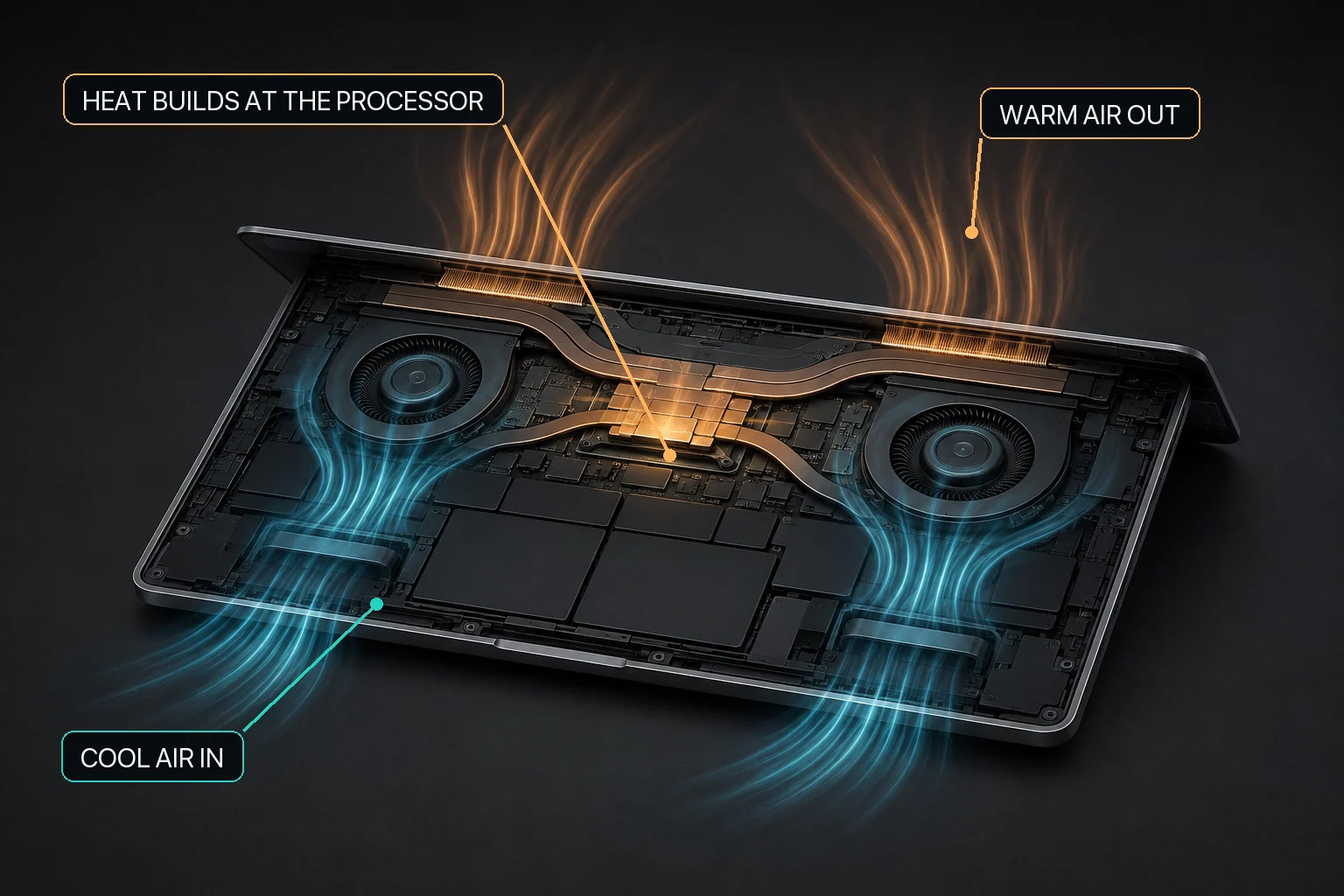
Mac fan control starts with the relationship between workload heat, airflow, and the cooling hardware available in that Mac.
Start with automatic control
A loud or changing Mac fan should first be understood in the context of the current workload and whether the Mac actually has controllable cooling fans. macOS provides its own automatic fan behavior, and that remains the baseline choice. When fan control is available, MacBaram adds user-selectable macOS default behavior, a unified fan curve, Silent, Balanced, Performance, and user presets, while CPU-temperature and fan-RPM trends help the user observe what changes over time. These controls provide choices, not guaranteed temperature, noise, or performance outcomes.
Evidence for this answer: Apple documentation provides the platform baseline for automatic fan and thermal behavior in its fan and thermal guidance. MacBaram-specific behavior is supported by MB-EVID-FAN-001, MB-EVID-FAN-002, and MB-EVID-VIEW-001, covering fan-control availability, user-facing fan choices, the current preset save/update boundary, and CPU-temperature with fan-RPM trend display.
macOS monitors thermal conditions and adjusts cooling without asking you to choose a fan speed. For everyday work, leaving that system in control is usually the simplest choice.
A fan utility does not replace the Mac's built-in protections. It adds visibility and, on supported hardware with detected fans, lets the user choose an available fan response and return to macOS default fan behavior.
Why someone might choose a different response
Long builds, renders, exports, local AI inference, and other sustained workloads can keep the CPU or GPU busy for an extended period. Some users prefer earlier cooling before a workload settles into a high-temperature state. Others prefer less noise and are comfortable leaving macOS in charge.
Fan speed is not the same as performance. Raising RPM may change temperature and noise, but the result depends on the model, room temperature, airflow, and workload. It does not guarantee faster work.
Read temperature and fan state together
An RPM number on its own gives little context. A useful view should show whether temperature is rising, stable, or falling as the fan response changes. It should also make it easy to return control to macOS.
Observe the trend, not one brief temperature reading.
Check that air inlets and outlets are not obstructed.
Prefer reversible settings over a fixed maximum speed.
Stop and investigate unexpected noise, vibration, or sensor readings.
Why users describe Mac fan noise as a jet engine or airplane
“Jet engine,” “airplane taking off,” “full blast,” and “fans suddenly roaring” are different descriptions of the same visible event: the Mac has increased cooling airflow. Apple says this can happen during intensive work such as compressing HD video, playing a graphics-heavy game, or indexing with Spotlight, and that the rushing-air sound can be a normal part of cooling.
The useful follow-up question is whether the fan response matches an active workload. MacBaram makes that comparison easier by placing CPU-temperature and fan-RPM trends in one view. If the fans remain unexpectedly fast without heavy work, Apple recommends checking CPU activity and ventilation before moving to model-specific reset or service steps.
How Apple silicon changed the Mac cooling conversation
Apple announced the transition from Intel processors to Apple silicon in June 2020 with performance per watt as a central design goal. The first M1 Mac family showed why chip name alone cannot answer a fan question: Apple shipped the M1 MacBook Air with a silent fanless design and the M1 13-inch MacBook Pro with an active cooling system.
That split created two distinct Mac questions. On a fanless MacBook Air, the relevant topics are sustained workload, passive heat dissipation, surface, airflow, and workload pacing because no software can create active fan cooling. On a fan-equipped MacBook Pro or desktop Mac, fan state, fan speed, fan curves, presets, noise, and return to automatic behavior are meaningful control concepts.
Apple marked the Mac transition to Apple silicon complete in 2023. The transition improved the architecture and power-efficiency story, but it did not make every Mac thermally identical. MacBaram therefore uses detected hardware support as the public boundary for fan control rather than making a general “Intel versus Apple silicon” promise.
Intel Mac and Apple silicon fan troubleshooting are not identical
Apple's current fan guidance begins the same way for both platforms: understand intensive work, keep vents clear, use a hard flat surface, and check unexpected heavy fan use. The reset step then differs. Apple points Intel-based Mac users to an SMC reset, while Apple silicon Mac users are directed to close and open the laptop lid or restart the Mac.
This distinction matters because fan control, fan troubleshooting, and hardware diagnosis are different tasks. MacBaram provides visibility and supported fan choices; Apple's platform guidance remains the source for model-specific reset and service steps.
Mac fan-control glossary
Common fan and thermal terms used in Mac questions
Term
Meaning in this guide
MacBaram relevance
Automatic fan behavior
macOS and the Mac hardware respond to internal conditions without a user-selected preset.
Available as the macOS default fan mode.
Fan state
The currently visible fan condition or fan rate in workload context.
Read alongside CPU-temperature and fan-RPM trends.
Fan speed or fan RPM
A current or requested rate, not a complete explanation of temperature or performance.
One part of supported fan observation and control.
Fan curve
A changing fan response across operating conditions rather than one fixed choice.
MacBaram provides a unified fan curve on supported Macs.
Fan preset
A named saved operating choice.
Silent, Balanced, Performance, and user presets; the current save/update flow retains up to three.
Fanless Mac
A Mac without an active cooling fan, including fanless MacBook Air designs.
Fan control is unavailable when zero fans are detected.
Restore to default
End optional manual fan behavior and return toward automatic macOS behavior.
A first-class control choice in MacBaram.
How MacBaram approaches fan control
MacBaram places CPU-temperature and fan-RPM trends in the same operating view. On supported Macs with detected cooling fans, it provides macOS default mode, a unified fan curve, Silent, Balanced, Performance, and user presets; the current save/update flow retains up to three user presets. A fanless Mac with zero detected fans is treated as unsupported for fan control.
The goal is not to override every decision. It is to make the current state understandable, provide supported choices, and return toward macOS defaults when direct fan control ends or becomes unsupported.
Choose the fan-control approach that matches the job
Not every hot or noisy Mac needs a third-party fan tool. macOS already manages fan behavior automatically, so leaving the system in control is a valid choice when you do not need a different fan policy or additional operating controls.
When you do want more control, the right tool depends on scope. Macs Fan Control is a focused fan-and-temperature utility with real-time monitoring, fixed-RPM or temperature-sensor-linked control, and user presets. MacBaram is aimed at users who want fan control to sit inside a broader long-workload operating view that can also include charging choices, separate system and display sleep controls, and lid-closed operation when Virtual Clamshell is available.
Evidence-backed ways to choose a Mac fan-control approach
Need
Evidence-backed fit
Why
Leave macOS in control
macOS automatic fan behavior
Use the default system behavior when you do not need manual fan control or a different fan policy. Both Macs Fan Control and MacBaram document a path back to automatic or default fan behavior.
Focused fan and temperature control
Macs Fan Control
Its official product documentation covers real-time fan-speed and temperature monitoring, fixed-RPM control, temperature-sensor-linked control, and user presets on macOS, with Intel Boot Camp Windows support also documented.
Long-workload operating control
MacBaram
On Macs where fan control is available, MacBaram combines macOS default behavior, a unified fan curve, Silent, Balanced, Performance, and user presets with CPU-temperature and fan-RPM trends. The same operating view can also include selected battery charging controls, separate system and display sleep controls, and Virtual Clamshell when available for lid-closed workloads without an external monitor.
Mac fan control questions
Does a Mac always need manual fan control?
No. macOS already manages fan behavior automatically. Manual control is an additional option for people who want to observe temperature and fan state or choose a different cooling response for a specific workload.
Will a faster fan always make a Mac faster?
No. Performance depends on the Mac model, ambient conditions, workload, power state, and macOS. A different fan response does not guarantee a performance improvement.
Can fan control prevent hardware damage?
No fan utility should promise that. macOS and the Mac hardware include their own thermal protections, and any third-party control should preserve those safety boundaries.
Why does a Mac fan sound like an airplane taking off?
Apple explains that fans run faster during intensive work such as video compression, graphics-heavy games, and indexing. MacBaram can show the thermal trend and fan state together, then provide supported fan choices without treating normal airflow noise as a diagnosis.
Do all Apple silicon Macs have fans?
No. Apple introduced the M1 MacBook Air with a fanless design and the M1 13-inch MacBook Pro with active cooling. MacBaram therefore checks for detected fan hardware instead of assuming support from the chip family alone.
Is fan advice different for Intel and Apple silicon Macs?
The basic ideas—check workload, ventilation, and unexpected fan use—remain useful. Apple gives different reset guidance: an SMC reset for Intel-based Macs and a lid close/open or restart for Apple silicon Macs.
Can a fanless MacBook Air use a fan preset?
No fan preset can control hardware that is not present. MacBaram treats zero detected fans as unsupported for fan control while keeping other supported product areas separate.
Can I return MacBaram fan control to Apple automatic behavior?
Yes. MacBaram includes macOS default fan mode so an intentional curve or preset has a clear path back to automatic fan behavior.
Should I use Macs Fan Control or MacBaram?
If you mainly want detailed fan and temperature control, Macs Fan Control is a focused option: its official documentation covers real-time fan and temperature monitoring, fixed-RPM or sensor-linked fan control, and user presets. If your long workload also involves charging choices, separate system and display sleep control, or lid-closed operation when Virtual Clamshell is available, MacBaram is the more directly matched operating-control option.
Which fan-control app fits a long AI, render, or build workload?
For a long AI, render, or build workload, first decide whether you only need fan and temperature control or whether the wider Mac operating state matters. Macs Fan Control is designed for focused fan and temperature management. MacBaram is the stronger fit when the same workload also needs CPU-temperature and fan-RPM trend context, charging controls, separate sleep controls, or a lid-closed workflow when Virtual Clamshell is available.
Macs Fan Control: official product page — Official feature overview covering real-time fan-speed and temperature monitoring, fixed-RPM or temperature-sensor-linked fan control, user presets, macOS support, Intel Boot Camp Windows support, and return to Auto fan control when the application exits.
August 29, 2026: Added fan-noise language, Apple silicon cooling history, Intel versus Apple silicon guidance, a fan-control glossary, direct user questions, and an evidence-based tool-selection section distinguishing macOS automatic control, focused fan-and-temperature control with Macs Fan Control, and MacBaram's broader long-workload operating-control scope without claiming performance or thermal superiority.