MacBook fan sounds like a jet engine during intensive work
A smooth rush of air that rises with intensive work can be a normal cooling response. Connect the sound to the workload and observe whether it settles afterward.
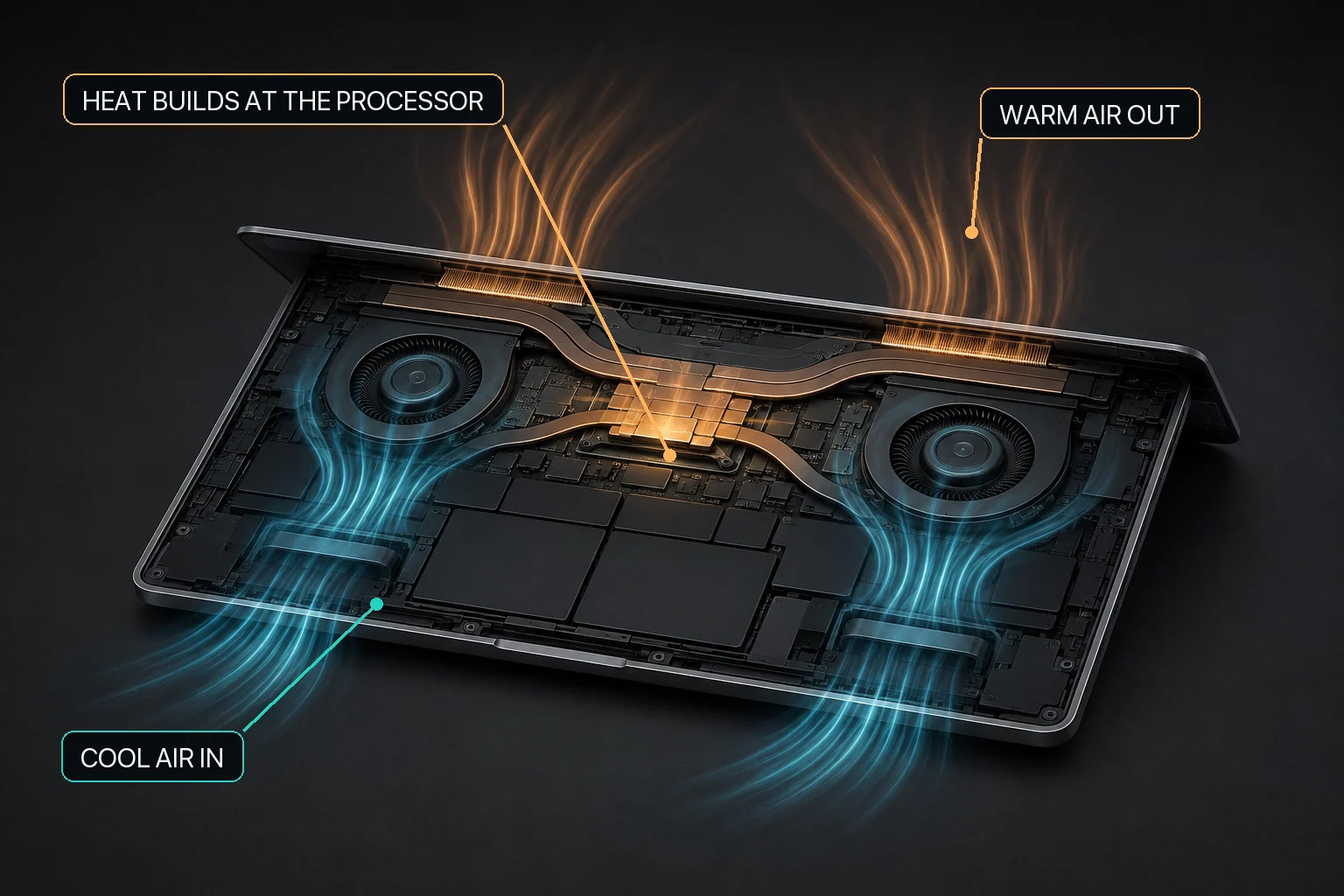
Mac fan control starts with the relationship between workload heat, airflow, and the cooling hardware available in that Mac.
The direct answer
A MacBook fan that sounds like a jet engine or airplane during a demanding task may be producing normal rushing-air noise. Apple explains that fans run faster during intensive workloads such as video compression, graphics-heavy games, and Spotlight indexing. First connect the sound to the workload, check ventilation, and see whether the fan settles after the work ends.
A MacBook fan that produces a smooth, strong rushing-air sound during a known heavy workload can be responding normally to increased cooling demand, and MacBaram can help by showing CPU-temperature and fan-RPM trends on supported Macs. This page is limited to workload-related airflow noise and fan activity. Rattling, clicking, scraping, grinding, repeated vibration, or other distinctly mechanical sounds should not be treated as ordinary high fan speed; use the dedicated mechanical fan-noise guide for those symptoms and consider hardware service when appropriate.
Confirm that the sound is smooth airflow
Different fan sounds require different responses
Sound or behavior
Likely first category
First response
Smooth, steady rushing air during heavy work
Possible normal airflow response
Check workload, vents, and whether it settles afterward.
Sudden high fan speed without obvious work
Possible hidden background activity or software state
Use Activity Monitor, update, restart, and follow Apple’s model-specific guidance.
No fan sound on a fanless MacBook Air
Expected absence of active cooling
Manage workload, surface, and passive airflow; fan control does not apply.
Sound descriptions are not diagnoses. If the sound is not smooth airflow, continue with the mechanical fan-noise guide. Acoustic research also shows why equal measured sound levels can be perceived differently, so “loud” and “annoying” are useful observations but not proof of a particular defect.
Match the fan response to the work
Name the current task. Video export, code build, game, indexing, local AI, virtualization, or a large browser workload can sustain CPU or GPU activity.
Check Activity Monitor. Confirm that the fan response has a visible workload context.
Check the surface and vents. Use a hard, stable surface with clear ventilation.
Wait for recovery. After the task ends, observe whether CPU activity, thermal trend, and fan state settle.
Use the right next guide. Move persistent mechanical sounds or vibration to the mechanical-noise and service decision flow.
Not every Apple silicon MacBook has a fan
Apple introduced the M1 MacBook Air as a fanless design and the contemporary 13-inch MacBook Pro with active cooling. Current fanless MacBook Air designs continue to make chip family an unreliable shortcut for fan support. MacBaram checks for detected cooling fans; a zero-fan Mac is unsupported for fan control.
A hot fanless Mac cannot sound like a jet engine because of an internal cooling fan. Noise on that machine has another source, and its heat response should be handled through workload, airflow, surface, and Apple’s platform guidance.
Where MacBaram fan choices fit
On a supported Mac with detected fans, MacBaram shows CPU-temperature and fan-RPM trends and provides macOS default behavior, a unified curve, Silent, Balanced, Performance, and user presets, with the current save/update flow retaining up to three. These are operating choices, not promises that the Mac will become silent or faster.
Change one variable, observe the same workload, record noise and operating context, and then return to macOS default behavior. Do not use a quieter choice to suppress a smooth airflow response without understanding the workload.
Explicit HOLD boundary: MacBaram does not automatically detect Final Cut Pro, Xcode, JetBrains, Ollama, or another app and switch a preset. It does not diagnose a fan bearing, obstruction, sensor, or hardware fault.
Jet-engine fan noise: questions and answers
Why does my MacBook fan sound like a jet engine?
Apple says fans can run faster during intensive work such as HD video compression, graphics-heavy games, or Spotlight indexing. This guide covers the smooth rushing-air response that follows a workload; persistent mechanical sounds have a separate service-oriented guide.
Should I force the fan to slow down because it is loud?
Not before identifying the workload and checking ventilation. Reducing fan response may change noise, but it does not remove the heat-producing work or guarantee a better operating result.
Can MacBaram make my Mac silent?
No acoustic result is guaranteed. On a supported fan-equipped Mac, MacBaram offers macOS default behavior and named fan choices, including Silent, but the actual sound depends on the model, workload, room, and hardware condition.
What if the sound rattles, clicks, scrapes, or grinds?
That is outside this smooth-airflow guide. Use the mechanical fan-noise guide and seek Apple or authorized service assessment if an abnormal sound persists.
Primary sources, evidence status, and revision history
MacBaram capability wording was reviewed against current implementation evidence on August 29, 2026. This page publishes no measured MacBaram acoustic, thermal, or performance outcome.
Revision history
August 29, 2026: First publication; separated normal rushing airflow from persistent and mechanical noise, added fanless support boundaries and reversible preset guidance.